Flats on the facade
Every flat lit in its colour: available, reserved, sold. Not a table of numbers but the building, where the windows actually are.
For developers and sales teams
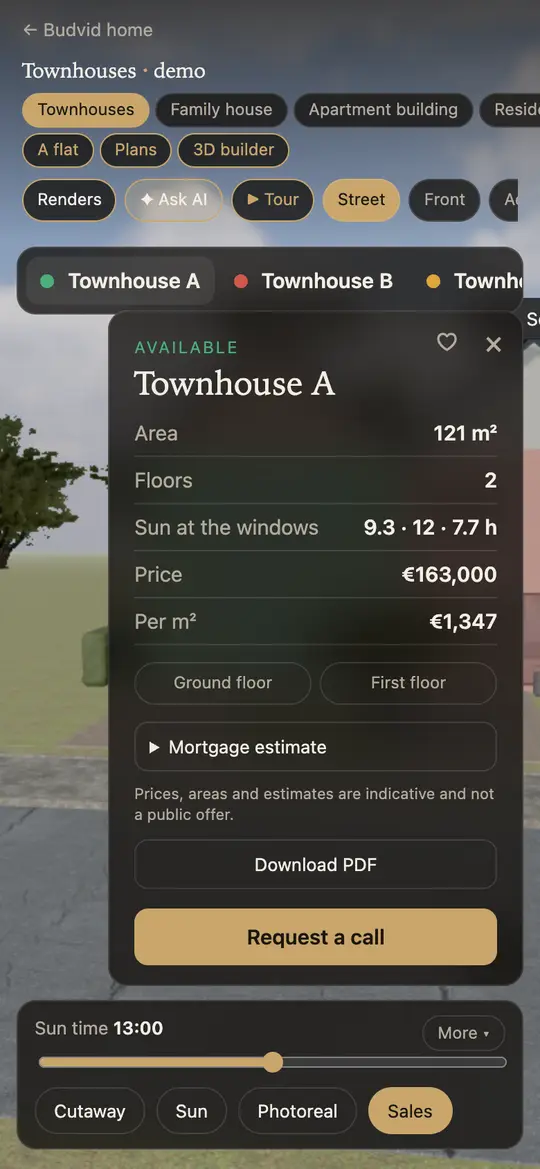
Buyers see available, reserved and sold flats right on the facade, open the furnished floor plan, the price and the sunlight in its windows — and leave a request. It reaches your Telegram or CRM within seconds.
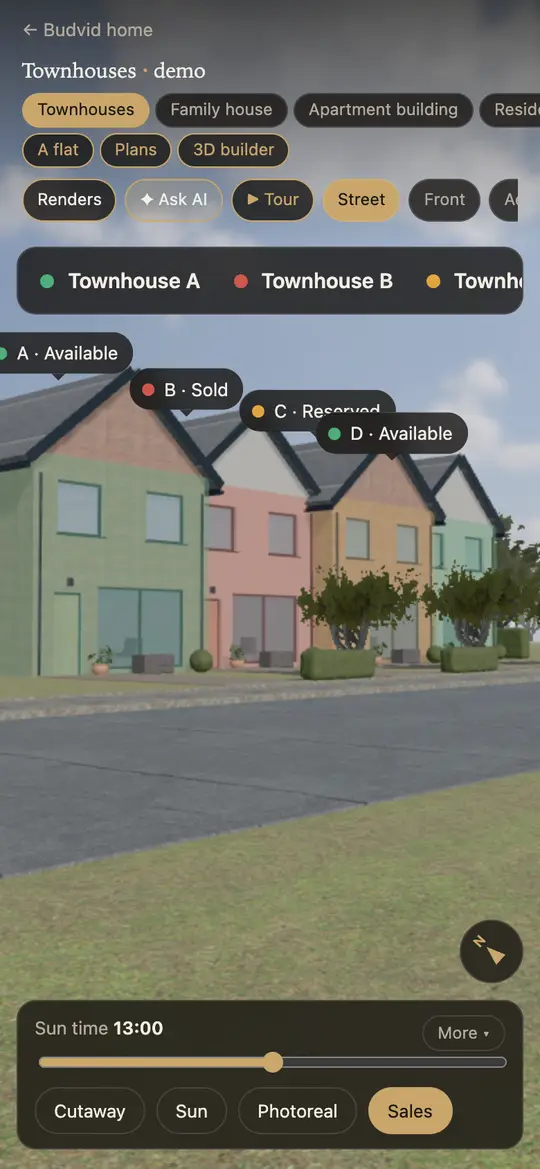
Every flat lit in its colour: available, reserved, sold. Not a table of numbers but the building, where the windows actually are.
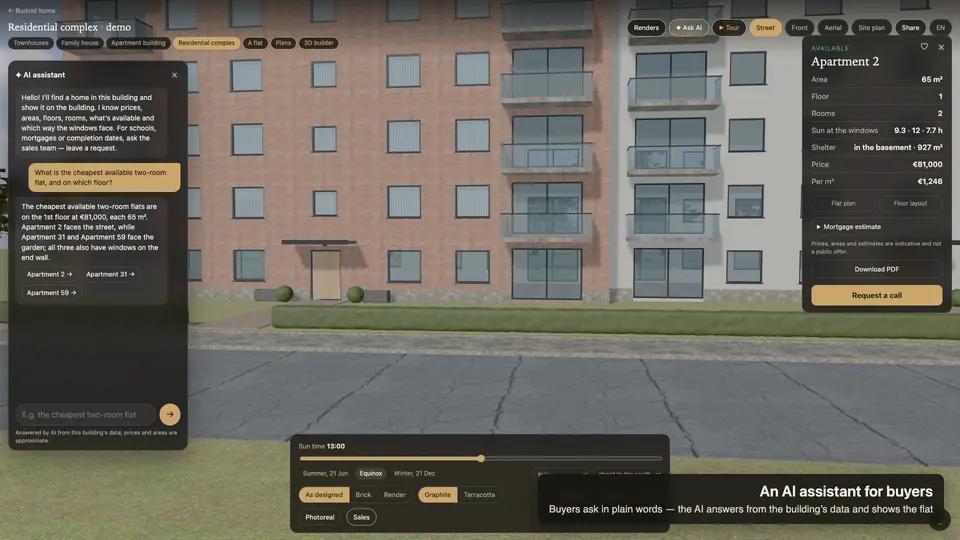
Area, rooms, floor, price and instalments, a furnished floor plan and how many hours of sun each window gets.
A name and a phone number — and the request, with the flat’s number, is with your sales team. No call asking what’s left on the third floor.
A buyer types “the cheapest two-bedroom” or “what’s free on the sunny side” — the AI answers from your sales chart and shows the flats on the building.
Copy the code in the cabinet and paste it into the page — WordPress, Webflow, Tilda or any site builder. No developer needed. There is also your own link, budvid.com/p/name, for messengers and ads: its preview shows your own building.
Upload a floor plan — a photo, a PDF or a DXF from AutoCAD. The AI traces the block and the flats in about a minute; you check it. Drawings → 3D
Telegram within seconds. Your CRM by a signed webhook, retried if the CRM is down. A delivery log in the cabinet.
The building turns under a finger, the card opens from the bottom, the request takes two fields. Nothing to install.
You pay for projects, not leads: however many requests come in, the price stays the same.
$1 for 7 days: one project, AI tracing, leads to Telegram.
$29 a month: a house, townhouses or a cottage village with a sales chart and instalments.
$79 a month: up to 3 apartment complexes, leads to CRM and Telegram, an API.
$199 a month: up to 15 projects for a developer with several complexes.
It is the sales chart of a building — every flat by floor and section with its status (available, reserved, sold), area and price — shown on the building itself. In Budvid a buyer sees the available flats on a 3D model of the facade, taps one and opens its card with the floor plan, the price and a request form.
Copy the embed code in the cabinet — one <iframe> line — and paste it into the page. It works on WordPress, Webflow, Tilda and any site builder; no developer needed.
In the cabinet: one click per flat or for all at once, a price per m² for the whole building. Or upload a spreadsheet from Excel or CSV: flats are matched by number, statuses by words such as available, reserved, sold. Changes show on the website at once.
The Complex plan is $79 a month: up to 3 apartment complexes with a sales chart, leads to your CRM and Telegram. A house or townhouses: $29 a month. Try it with a 7-day test drive for $1. Leads are unlimited and never charged separately.
Yes. The building turns under a finger, the flat’s card opens from the bottom, the request takes two fields. A link from an ad or a messenger opens on a phone, with nothing to install.
To your Telegram chat within seconds and to your CRM by webhook (signed JSON, retried if the CRM is down). Every request is also kept in the cabinet and downloads as CSV.
The demo is a row of townhouses with a sales chart, floor plans and a request form. Open it on your phone — that is how your buyers will see it.